

Have you ever wanted to build a light that automatically switches ON when the surroundings become dark and switches OFF when there is enough light? In this beginner-friendly electronics project, we will build an Automatic Night Light using an LDR and an IRLZ44N MOSFET.
This project uses a Light Dependent Resistor (LDR) to detect ambient light and a MOSFET to control four white LEDs. A 10K preset allows you to adjust the light level at which the LEDs switch ON or OFF.
The circuit runs on a regulated 5V supply, making it a simple DIY electronics project for beginners.
Project: Automatic Night Light
Series: DigitalLab Beginner Electronics Projects – EP5
Difficulty: Beginner
Power supply: Regulated 5V USB
Main components: LDR, IRLZ44N MOSFET, 10K preset, and four white LEDs
1. How Does an Automatic Night Light Work?
An automatic night light detects the surrounding light level and switches its LEDs accordingly.
The circuit uses three main elements:
- LDR: Detects changes in ambient light.
- 10K preset: Adjusts the light level at which the circuit switches.
- IRLZ44N MOSFET: Acts as an electronic switch to control the LEDs.
When the surroundings are bright, the circuit keeps the LEDs OFF. When the surroundings become dark, the circuit switches the LEDs ON.
This makes the circuit useful as a simple night light for a room, cupboard, or other indoor location.
2. Components Required
The following components were used to build this project.
| Component | Quantity | Purpose |
|---|---|---|
| IRLZ44N N-channel MOSFET | 1 | Switches the LEDs |
| LDR (Light Dependent Resistor) | 1 | Detects ambient light |
| 10K preset potentiometer | 1 | Adjusts light sensitivity |
| White LEDs | 4 | Provide illumination |
| 220Ω resistors | 4 | Limit LED current |
| 1K resistor | 1 | Connects the sensor output to the MOSFET gate |
| 100K resistor | 1 | Keeps the MOSFET gate LOW when not driven |
| Regulated 5V USB power supply | 1 | Powers the circuit |
| Breadboard and jumper wires | As required | Circuit assembly |
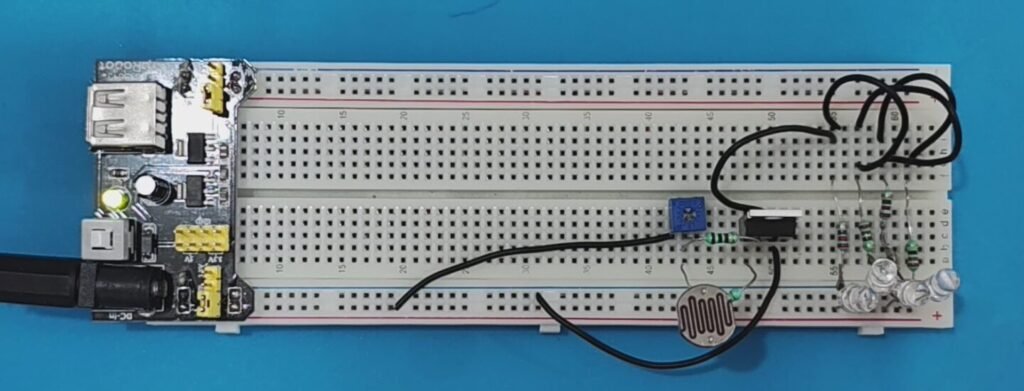
The circuit was initially planned with five LEDs, but the completed version uses four white LEDs.
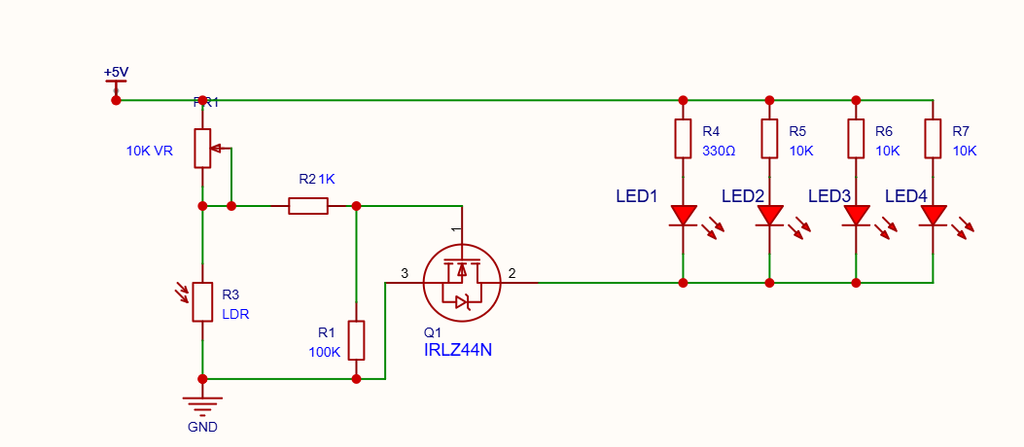
3. Circuit Connections
The circuit has two main sections:
- The LDR sensor and sensitivity adjustment section.
- The MOSFET-controlled LED output section.
3.1 LDR Sensor Section
The LDR and 10K preset form a voltage divider that responds to changes in ambient light.
Connect the components as follows:
- Connect one outer terminal of the 10K preset to +5V.
- Connect the preset’s middle terminal (wiper) and the other outer terminal together to form the SENSE connection.
- Connect one terminal of the LDR to SENSE.
- Connect the other LDR terminal to GND.
- Connect SENSE to the MOSFET Gate through a 1K resistor.
- Connect a 100K resistor between the MOSFET Gate and GND.
Using the preset as a variable resistor allows you to adjust the circuit’s switching threshold.
3.2. MOSFET Connections
The IRLZ44N is used as a low-side switch. It controls the current flowing through the LEDs.
With the labelled flat face of the MOSFET toward you and its legs pointing downward, the usual pinout is:
| Pin | Connection |
|---|---|
| Left | Gate (G) |
| Middle | Drain (D) |
| Right | Source (S) |
The metal tab is also connected to Drain. Verify the pinout against the datasheet for your particular component.
Connect the MOSFET as follows:
- Gate (G): Connect to SENSE through the 1K resistor.
- Drain (D): Connect to the common cathode connection for all four LEDs.
- Source (S): Connect to GND.
The 100K resistor between Gate and GND helps keep the MOSFET switched OFF when the gate is not being driven HIGH.
3.3. LED Connections
Each LED must have its own current-limiting resistor.
For each of the four LED branches, connect:
+5V → 220Ω resistor → LED anode (+) → LED cathode (−) → MOSFET Drain (D)
Connect all four LED cathodes to the common Drain connection.
The MOSFET Source connects to GND.
Important: Do not use one shared 220Ω resistor for all four LEDs. Each LED requires its own series resistor.
4. Working Principle
The circuit works by converting changes in ambient light into a change in voltage at the MOSFET Gate.
When the surroundings are bright
The LDR’s resistance decreases when more light falls on it. With the LDR connected between SENSE and GND, the SENSE voltage falls.
The MOSFET Gate voltage becomes LOW, switching the MOSFET OFF. As a result, current stops flowing through the LED branches and all four LEDs turn OFF.
When the surroundings become dark
The LDR’s resistance increases as the light level decreases. The voltage at SENSE rises because of the adjustable resistance connected toward +5V.
The MOSFET Gate voltage rises, switching the MOSFET ON. Current flows through the four LED branches, and the LEDs illuminate.
Adjusting the sensitivity
The 10K preset controls the switching threshold.
Turn the preset gradually until the LEDs switch ON at the desired darkness level. The exact adjustment direction depends on which outer preset terminal is connected to +5V.
5. Powering the Circuit Using USB
The circuit operates from a regulated 5V supply. A standard 5V USB charger or power bank can provide the required power.
For a simple permanent build, a suitable USB cable can be used to bring power into the enclosure.
The power conductors must be identified and verified before connecting them to the circuit. Do not rely on wire colours alone, and do not assume that the cable shield or USB metal shell is the power return.
- Connect verified USB VBUS (+5V) to the circuit’s +5V input.
- Connect verified USB GND to the circuit’s GND.
- Leave the USB data wires disconnected and insulate them individually.
- Insulate any exposed shielding and secure the cable where it enters the enclosure.
Complete all soldering and insulation with the USB cable disconnected from the charger. Check for accidental shorts before applying power.
The four LEDs draw approximately 32–36mA in total, depending on their forward voltage, so a standard regulated 5V USB supply is sufficient.
6. Testing the Circuit
After completing the connections, test the circuit under different lighting conditions.
| Test condition | Expected result |
|---|---|
| LDR exposed to bright light | All four LEDs OFF |
| LDR covered | All four LEDs ON |
| Ambient light changes | Switching threshold depends on the preset setting |
If the circuit does not behave as expected, check the following:
- Verify the LED polarity.
- Confirm that each LED has its own 220Ω resistor.
- Check the IRLZ44N Gate, Drain, and Source connections.
- Verify the LDR and preset wiring.
- Check that the circuit has a common GND.
- Adjust the preset gradually and test again.
During my initial build, the LEDs did not work as expected because an LED was connected incorrectly. Correcting the LED connection resolved the problem, and the complete circuit then switched ON in darkness.
This is a useful reminder to check LED polarity carefully when troubleshooting a new circuit.
7. Final Assembly
The circuit can first be assembled and tested on a breadboard. Once it works reliably, it can be transferred to perfboard and fitted into a suitable plastic enclosure.
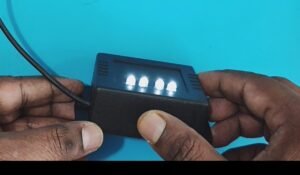
During final assembly:
- Secure the circuit so that the connections cannot loosen.
- Keep the LDR exposed to ambient light.
- Position the LEDs so their light does not shine directly onto the LDR.
- Secure the USB cable to prevent pulling on the solder joints.
- Check all connections before powering the completed unit.
After assembly, test the night light in both bright and dark conditions to confirm that the switching remains reliable.
8. Video Demonstration
Watch the DigitalLab EP5 video to see the Automatic Night Light circuit being built and tested.
YouTube video:
The video demonstrates the circuit operation, the components used, sensitivity adjustment, USB power, and the completed night light.
9. Conclusion
In this project, we built a simple Automatic Night Light using an LDR, an IRLZ44N MOSFET, a 10K preset, and four white LEDs.
The circuit automatically switches the LEDs ON in darkness and OFF in bright light. The adjustable preset makes it possible to choose the desired switching threshold, while the 5V USB supply keeps the power arrangement simple.
This project introduces several useful electronics concepts, including voltage dividers, light sensing, MOSFET switching, and LED current limiting.
If you are learning electronics, this is a practical beginner project that demonstrates how a few inexpensive components can be combined to create an automatic lighting circuit.
Explore more beginner electronics projects and tutorials on DigitalLab.