

In this project, we will build a simple temperature and humidity monitoring system using the ESP32 and a DHT22 sensor. The measured values are displayed on the Serial Monitor as well as a 16×2 LCD with an I2C interface.
This project is part of the DigitalLab ESP32 Beginner Series – EP3.
The project is suitable for beginners who want to learn how to interface sensors and displays with the ESP32 using the Arduino IDE.
Components Required
- ESP32 DevKit V1 – 38-pin board
- DHT22 temperature and humidity sensor module
- 16×2 character LCD with I2C Driver board
- Breadboard
- Jumper wires
- USB cable
Project Overview
The DHT22 sensor measures the surrounding temperature and relative humidity. The ESP32 reads the sensor data and displays the values on the Serial Monitor and the LCD.
The project is completed in two stages.
Stage 1 – DHT22 with Serial Monitor
In the first stage, we connect the DHT22 sensor to the ESP32 and read temperature and humidity values.
The sensor readings are displayed in the Arduino IDE Serial Monitor.
This stage helps us verify that the sensor is working correctly before adding the LCD display.
Stage 2 – Add the I2C LCD
In the second stage, we connect a 16×2 LCD using its I2C interface.
The LCD displays:
- Temperature in degrees Celsius
- Relative humidity in percentage
The sensor readings continue to be displayed in the Serial Monitor as well.
Circuit Connections
DHT22 Sensor
| DHT22 Module | ESP32 |
|---|---|
| VCC | 3.3V |
| DATA | GPIO 4 |
| GND | GND |
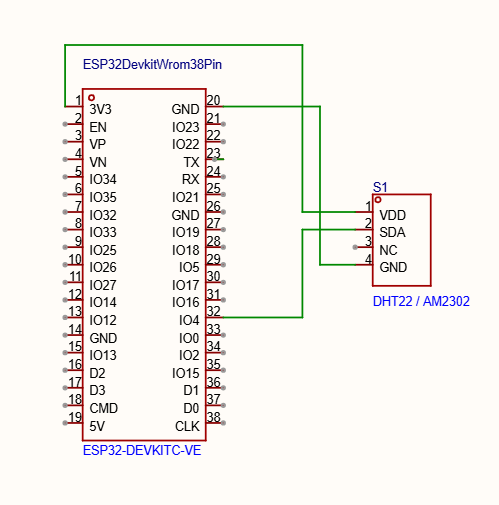
A typical 3-pin DHT22 module includes a pull-up resistor, so an additional 10K resistor is not required.
If you are using a bare 4-pin DHT22 sensor, then you will need pull-up resistor.
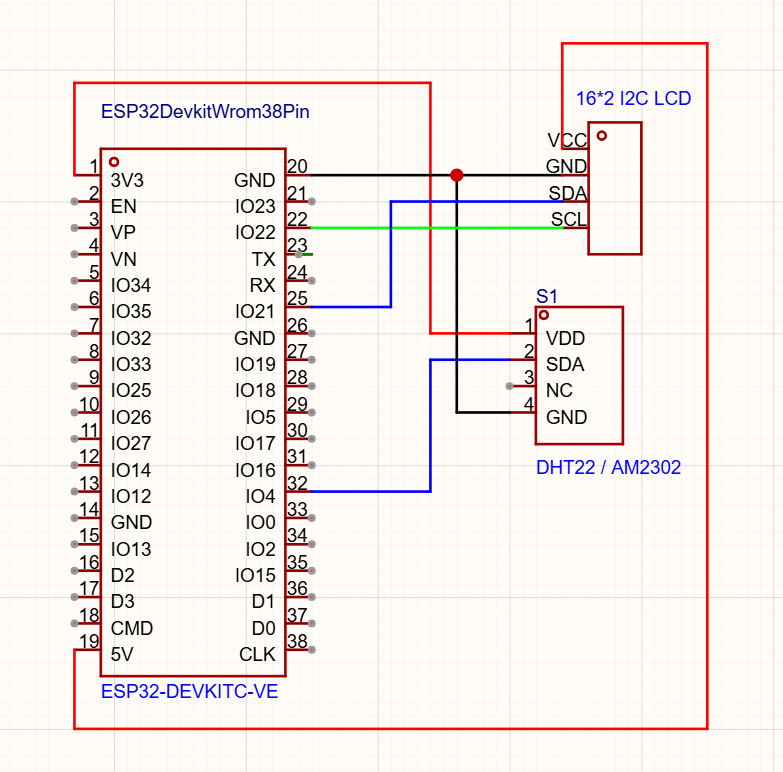
I2C LCD
| LCD Pin | ESP32 |
|---|---|
| VCC | Supply supported by the LCD module |
| GND | GND |
| SDA | GPIO 21 |
| SCL | GPIO 22 |
The ESP32 uses GPIO 21 for SDA and GPIO 22 for SCL by default in this project.
Important: ESP32 GPIO pins are not 5V tolerant. If your LCD is powered at 5V, ensure that its I2C pull-up resistors do not pull SDA and SCL to 5V. Use a suitable I2C level shifter or a safe 3.3V pull-up arrangement.
Arduino IDE Setup
Install the following libraries using the Arduino IDE Library Manager:
- DHT sensor library by Adafruit
- Adafruit Unified Sensor
- LiquidCrystal I2C library
Select your ESP32 board and the correct COM port before uploading the program.
Working Principle
- The DHT22 sensor measures temperature and humidity and sends digital data to the ESP32 through its DATA pin.
- The ESP32 reads the sensor values and updates the display approximately every two seconds.
- The temperature is displayed in degrees Celsius, while humidity is displayed as a percentage.
- If the sensor reading fails, the program displays an error message instead of showing invalid values.
Project Result
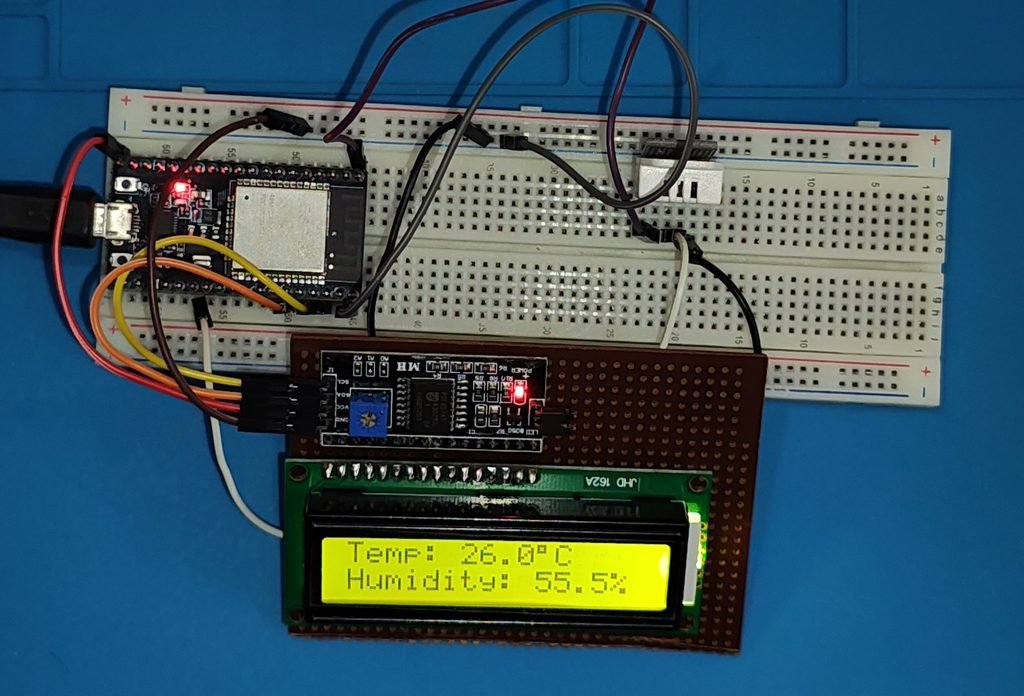
After completing both stages, the ESP32 temperature and humidity monitor displays live sensor readings on the I2C LCD and Serial Monitor.
Conclusion
The DHT22 temperature and humidity monitor is a useful beginner project for learning ESP32 programming.
In the next episodes of the DigitalLab ESP32 Beginner Series, we will explore more sensors and connectivity features to build practical ESP32-based projects.
Watch the project video below to see the complete circuit and demonstration.
YouTube Video: