

In this project, we are building an ESP32-based GPS Data Logger using the NEO-7M GPS module and a microSD card.
The goal is to capture GPS information such as latitude, longitude, speed, date, time, and satellite count, and save the data to an SD card so that it can be analyzed or visualized later.
This is EP1 of the GPS Data Logger series. In this episode, we focus on the core data-logging functionality:
- Getting GPS data from the NEO-7M.
- Parsing the GPS information using the ESP32.
- Connecting and initializing the SD card.
- Saving GPS data to files.
- Creating date/time-based filenames.
- Automatically creating a new file when the configured file-size limit is reached.
In the next episode, we will extend the project with a display and map visualization.
Project Overview
The basic architecture of the project is:
The NEO-7M receives signals from GPS satellites and provides the location information to the ESP32. The ESP32 processes this information and stores the useful data on the SD card. This approach makes the project useful for road trips, vehicle tracking, GPS experiments, and location-data logging.
Components Required
- ESP32 Dev Board ( I used 38 pin board)
- Neo-7M GPS module
- SD Card reader module
- Breadboard
- Jumper wires
- External Antenna (Required if working indoor)
Part 1 – Getting GPS Data
NEO-7M GPS Module
The NEO-7M is a commonly used GPS module that can provide information such as:
- Latitude
- Longitude
- Speed
- Date
- Time
- Number of satellites
- GPS fix status
- NMEA sentences
For this project, the NEO-7M communicates with the ESP32 using a serial interface.
GPS Wiring
The GPS module is connected to the ESP32 using a hardware serial port.
The connections used in this project are:
NEO-7M              ESP32 38-pin
--------------------------------
VCC       --------> 5V
GND       --------> GND
TX        --------> GPIO16
RX        --------> GPIO17
PPS       --------> Not connected
The GPS TX line sends data to the ESP32’s RX pin, while the ESP32’s TX line can be connected to the GPS RX pin for communication in the other direction.
Understanding GPS Data
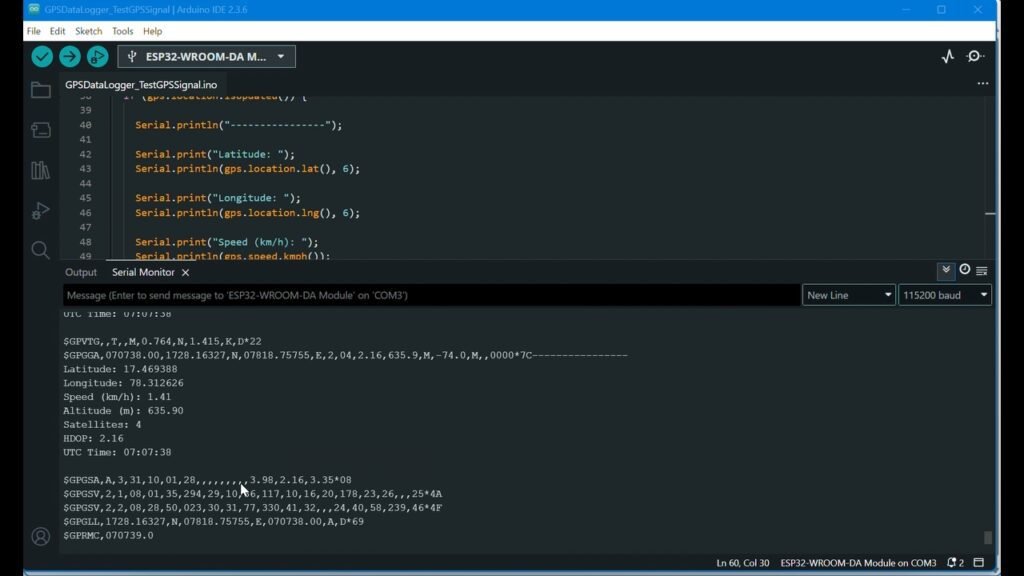
When the GPS module is connected, it continuously sends NMEA sentences.
Examples include:
$GPGSA,...
$GPGSV,...
$GPRMC,...
You will initially receive data in following formats
$GPRMC,…,V,… and
$GPGGA,…,0,00,…
V = No valid position
0   = No GPS fix
00  = 0 satellites currently being used for navigation
Instead of manually parsing each NMEA sentence, the project uses the TinyGPS++ library to extract the information we need.
Waiting for a GPS Fix
When the GPS module is first powered on, it may not immediately have a valid location. The GPS module needs to receive enough satellite information to calculate its position.
Once a valid fix is obtained, the ESP32 will recording the location. The exact time required to obtain a GPS fix depends on factors such as the environment, antenna position, satellite visibility, and whether the module has previously obtained satellite information.
For testing, it is preferable to place the GPS antenna where it has a reasonably clear view of the sky.
Part 1 – Code
Following code is to get test GPS signals. GPS data will be displayed on serial monitor. For this project since we are using TinyGPS++ library, you should install it first.
#include <TinyGPS++.h>

TinyGPSPlus gps;

HardwareSerial gpsSerial(2);

#define GPS_RX 16
#define GPS_TX 17

void setup() {
    delay(2000);

  Serial.begin(115200);

  Serial.println();
  Serial.println("ESP32 GPS Test");
  Serial.println("----------------");

  gpsSerial.begin(
    9600,
    SERIAL_8N1,
    GPS_RX,
    GPS_TX
  );

  Serial.println("GPS Serial Started");
}

void loop() {

  while (gpsSerial.available()) {

    char c = gpsSerial.read();
    Serial.write(c);
    gps.encode(c);

  }
  if (gps.location.isUpdated()) {

    Serial.println("----------------");

    Serial.print("Latitude: ");
    Serial.println(gps.location.lat(), 6);

    Serial.print("Longitude: ");
    Serial.println(gps.location.lng(), 6);

    Serial.print("Speed (km/h): ");
    Serial.println(gps.speed.kmph());

    Serial.print("Altitude (m): ");
    Serial.println(gps.altitude.meters());

    Serial.print("Satellites: ");
    Serial.println(gps.satellites.value());

    Serial.print("HDOP: ");
    Serial.println(gps.hdop.hdop());

    if (gps.time.isValid()) {

      Serial.print("UTC Time: ");

      if (gps.time.hour() < 10)
        Serial.print("0");

      Serial.print(gps.time.hour());
      Serial.print(":");

      if (gps.time.minute() < 10)
        Serial.print("0");

      Serial.print(gps.time.minute());
      Serial.print(":");

      if (gps.time.second() < 10)
        Serial.print("0");

      Serial.println(gps.time.second());
    }
  }
}
Part 2 – Saving GPS Data to an SD Card
Once the ESP32 can successfully read GPS information, the next step is to store it.
A microSD card provides a convenient way to record GPS data during a journey without requiring a computer or network connection.
The SD card uses the ESP32’s SPI interface.
SD Card Connections
| SD Card | ESP32 |
|---|---|
| CS | GPIO 5 |
| MOSI | GPIO 23 |
| MISO | GPIO 19 |
| SCK | GPIO 18 |
| VCC | 5V* ( Some module may require 3.3v) |
| GND | GND |
GPS Log Format
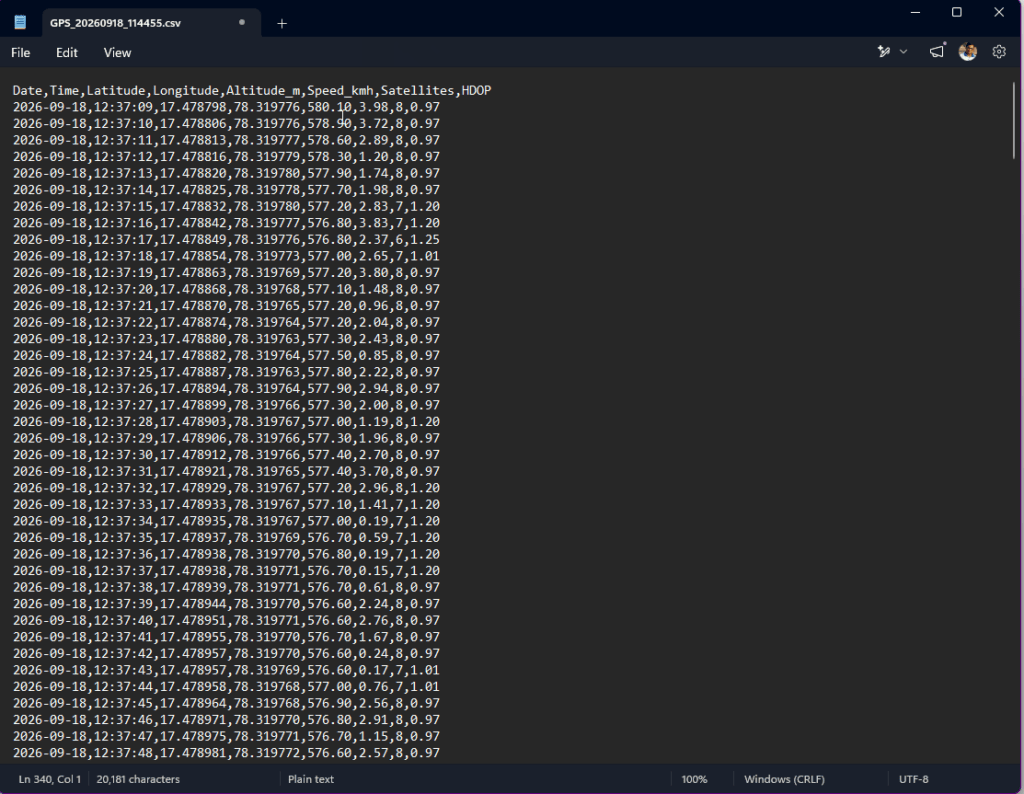
Instead of saving the complete raw NMEA stream, the project stores the useful GPS information in a structured format. We will log in below format:
Date,Time,Latitude,Longitude,Speed,Altitude,Satellites,HDOP
29/06/2026,11:20:31,17.385044,78.486671,0.00,542.30,8,1.20
29/06/2026,11:20:32,17.385050,78.486690,2.10,542.40,8,1.18
Date and Time Based File Names
Instead of creating files with simple names the logger uses the GPS date and time to create meaningful filenames.
For example:
GPS_20260906_214215.csv
This makes it much easier to identify when a particular recording was created.
The filename is basically based on:
GPS_YYYYMMDD_HHMMSS.csvAutomatic File Rotation
A GPS logger can potentially generate a large amount of data during a long journey. Instead of allowing one file to grow indefinitely, the project uses a configured maximum file size. When the current file reaches that limit, the logger automatically creates a new file.
This makes the logger more manageable and prevents a single log file from becoming unnecessarily large.
Flushing Data to the SD Card
The project also periodically flushes the file data to the SD card. This is important because data written by the program may initially be held in a buffer. Periodically calling flush() ensures that the buffered data is written to the card.
For example, the logger can periodically display:
[SD] GPS data flushed to card.This provides an additional level of protection against losing recently recorded data if power is interrupted.
During testing, the Serial Monitor will show information such as:
GPS: 17.469238, 78.311814 | Speed: 0.54 km/h | Satellites: 5

GPS: 17.469239, 78.311817 | Speed: 0.62 km/h | Satellites: 5

GPS: 17.469241, 78.311820 | Speed: 0.71 km/h | Satellites: 5

[SD] GPS data flushed to card.
At the same time, the information is being stored on the SD card.
Part 2 – GPS Logger Code
#include <Arduino.h>
#include <SPI.h>
#include <SD.h>
#include <TinyGPS++.h>

// ============================================================
// GPS Configuration
// ============================================================

#define GPS_RX_PIN 16
#define GPS_TX_PIN 17
#define GPS_BAUD   9600

HardwareSerial GPS(1);
TinyGPSPlus gps;


// ============================================================
// SD Card Configuration
// ============================================================

#define SD_CS_PIN 5

// Maximum file size
// 1 MB
#define MAX_FILE_SIZE (1024UL * 1024UL)

File logFile;


// ============================================================
// Logging Configuration
// ============================================================

#define LOG_INTERVAL   1000    // Log every 1 second
#define FLUSH_INTERVAL 5000    // Flush every 5 seconds

unsigned long lastLogTime = 0;
unsigned long lastFlushTime = 0;


// ============================================================
// Create New GPS Log File
// ============================================================

bool createNewLogFile()
{
    if (!gps.date.isValid() || !gps.time.isValid())
    {
        Serial.println("[GPS] Date/time not valid. Waiting...");
        return false;
    }

    char filename[50];

    snprintf(
        filename,
        sizeof(filename),
        "/GPS_%04d%02d%02d_%02d%02d%02d.csv",
        gps.date.year(),
        gps.date.month(),
        gps.date.day(),
        gps.time.hour(),
        gps.time.minute(),
        gps.time.second()
    );

    Serial.println();
    Serial.print("[SD] Creating new file: ");
    Serial.println(filename);


    // --------------------------------------------------------
    // Check for filename collision
    // --------------------------------------------------------

    if (SD.exists(filename))
    {
        char uniqueFilename[50];

        for (int i = 1; i <= 99; i++)
        {
            snprintf(
                uniqueFilename,
                sizeof(uniqueFilename),
                "/GPS_%04d%02d%02d_%02d%02d%02d_%d.csv",
                gps.date.year(),
                gps.date.month(),
                gps.date.day(),
                gps.time.hour(),
                gps.time.minute(),
                gps.time.second(),
                i
            );

            if (!SD.exists(uniqueFilename))
            {
                strcpy(filename, uniqueFilename);
                break;
            }
        }
    }


    // --------------------------------------------------------
    // Open file
    // --------------------------------------------------------

    logFile = SD.open(filename, FILE_WRITE);

    if (!logFile)
    {
        Serial.println("[ERROR] Failed to create GPS log file.");
        return false;
    }


    // --------------------------------------------------------
    // CSV Header
    // --------------------------------------------------------

    logFile.println(
        "Date,Time,Latitude,Longitude,Altitude_m,Speed_kmh,Satellites,HDOP"
    );

    logFile.flush();


    Serial.println("[SD] New GPS log file created.");
    Serial.println("[SD] CSV header written.");

    lastFlushTime = millis();

    return true;
}


// ============================================================
// Close Current File
// ============================================================

void closeCurrentFile()
{
    if (logFile)
    {
        logFile.flush();
        logFile.close();

        Serial.println("[SD] Current GPS file closed.");
    }
}


// ============================================================
// Setup
// ============================================================

void setup()
{
    Serial.begin(115200);

    delay(1000);

    Serial.println();
    Serial.println("======================================");
    Serial.println(" ESP32 GPS Data Logger - Part 2");
    Serial.println(" CSV Logger + File Rotation");
    Serial.println("======================================");


    // ========================================================
    // Start GPS
    // ========================================================

    GPS.begin(
        GPS_BAUD,
        SERIAL_8N1,
        GPS_RX_PIN,
        GPS_TX_PIN
    );

    Serial.println("[GPS] GPS serial started.");

    Serial.print("[GPS] RX: GPIO ");
    Serial.println(GPS_RX_PIN);

    Serial.print("[GPS] TX: GPIO ");
    Serial.println(GPS_TX_PIN);


    // ========================================================
    // Start SD Card
    // ========================================================

    Serial.println();
    Serial.println("[SD] Initializing SD card...");

    if (!SD.begin(SD_CS_PIN))
    {
        Serial.println("[ERROR] SD card initialization failed!");
        return;
    }

    Serial.println("[SD] SD card initialized successfully.");


    // ========================================================
    // Display SD Card Information
    // ========================================================

    uint8_t cardType = SD.cardType();

    Serial.print("[SD] Card type: ");

    if (cardType == CARD_MMC)
    {
        Serial.println("MMC");
    }
    else if (cardType == CARD_SD)
    {
        Serial.println("SDSC");
    }
    else if (cardType == CARD_SDHC)
    {
        Serial.println("SDHC");
    }
    else
    {
        Serial.println("UNKNOWN");
    }


    Serial.print("[SD] Card size: ");

    Serial.print(
        SD.cardSize() / (1024 * 1024)
    );

    Serial.println(" MB");


    // ========================================================
    // Wait for GPS
    // ========================================================

    Serial.println();
    Serial.println("[GPS] Waiting for valid GPS date/time...");
    Serial.println("[GPS] Waiting for GPS fix...");
}


// ============================================================
// Main Loop
// ============================================================

void loop()
{
    // ========================================================
    // Read GPS Data
    // ========================================================

    while (GPS.available())
    {
        gps.encode(GPS.read());
    }


    // ========================================================
    // Create First File
    // ========================================================

    if (!logFile)
    {
        if (gps.date.isValid() &&
            gps.time.isValid())
        {
            createNewLogFile();
        }
    }


    // ========================================================
    // Log GPS Data Every 1 Second
    // ========================================================

    if (millis() - lastLogTime >= LOG_INTERVAL)
    {
        lastLogTime = millis();


        // ----------------------------------------------------
        // Check GPS Position
        // ----------------------------------------------------

        if (gps.location.isValid())
        {
            // Make sure file exists
            if (!logFile)
            {
                if (!createNewLogFile())
                {
                    return;
                }
            }


            // =================================================
            // Date
            // =================================================

            char dateBuffer[20];

            snprintf(
                dateBuffer,
                sizeof(dateBuffer),
                "%04d-%02d-%02d",
                gps.date.year(),
                gps.date.month(),
                gps.date.day()
            );


            // =================================================
            // Time
            // =================================================

            char timeBuffer[20];

            snprintf(
                timeBuffer,
                sizeof(timeBuffer),
                "%02d:%02d:%02d",
                gps.time.hour(),
                gps.time.minute(),
                gps.time.second()
            );


            // =================================================
            // Write CSV Record
            // =================================================

            logFile.print(dateBuffer);
            logFile.print(",");

            logFile.print(timeBuffer);
            logFile.print(",");

            // Latitude
            logFile.print(
                gps.location.lat(),
                6
            );

            logFile.print(",");

            // Longitude
            logFile.print(
                gps.location.lng(),
                6
            );

            logFile.print(",");

            // Altitude in meters
            logFile.print(
                gps.altitude.meters(),
                2
            );

            logFile.print(",");

            // Speed in km/h
            logFile.print(
                gps.speed.kmph(),
                2
            );

            logFile.print(",");

            // Satellites
            logFile.print(
                gps.satellites.value()
            );

            logFile.print(",");

            // HDOP
            logFile.println(
                gps.hdop.hdop(),
                2
            );


            // =================================================
            // Serial Monitor Output
            // =================================================

            Serial.print("GPS: ");

            Serial.print(
                gps.location.lat(),
                6
            );

            Serial.print(", ");

            Serial.print(
                gps.location.lng(),
                6
            );

            Serial.print(" | Alt: ");

            Serial.print(
                gps.altitude.meters(),
                2
            );

            Serial.print(" m | Speed: ");

            Serial.print(
                gps.speed.kmph(),
                2
            );

            Serial.print(" km/h | Satellites: ");

            Serial.print(
                gps.satellites.value()
            );

            Serial.print(" | HDOP: ");

            Serial.println(
                gps.hdop.hdop(),
                2
            );


            // =================================================
            // Check File Size
            // =================================================

            if (logFile.position() >= MAX_FILE_SIZE)
            {
                Serial.println();
                Serial.println(
                    "[SD] Maximum file size reached."
                );

                Serial.println(
                    "[SD] Rotating to a new file..."
                );

                closeCurrentFile();

                // New file will be created on the
                // next valid GPS record.
            }
        }
        else
        {
            Serial.println(
                "[GPS] Waiting for valid GPS fix..."
            );
        }
    }


    // ========================================================
    // Flush Data Every 5 Seconds
    // ========================================================

    if (logFile &&
        millis() - lastFlushTime >= FLUSH_INTERVAL)
    {
        logFile.flush();

        lastFlushTime = millis();

        Serial.println(
            "[SD] GPS data flushed to card."
        );
    }
}
Testing the Logger
After allowing the GPS to obtain a valid fix, the logger can be tested by moving the GPS module around or taking it outside. Or attach an external GPS antenna like I did and place it in your balcony/Window.
Once you start receiving GPS Fix and see data in you serial monitor GPS logger will start writing the information in a CSV file and store it in SD card. After some interval, disconnect the setup from power and remove the SD card and verify the CSV file Format. The data should look as shown below.
What’s Next?
With EP1 complete, we now have the basic GPS data logger working:
NEO-7M → ESP32 → SD Card
In EP2, we’ll make the project more useful by adding a display and working with the recorded GPS data.
The next stage will include:
- Adding an TFT display
- Showing live GPS information
- Displaying latitude and longitude
- Showing speed and satellite count
- Integrating the display with the existing GPS logger
- Taking the recorded GPS data from the SD card
- Visualizing the recorded journey on a map
The ultimate goal is to turn the project into a practical GPS road-trip logger that can record a journey and allow the route to be viewed later.
Watch the build
I walk through the whole project step by step in the video: