Skip to content Skip to content
  • Home
  • Blog
  • Projects
  • How-To
  • Tutorials
  • Privacy Policy
  • About
Digital Lab

A home to software testing, electronics circuits & projects, tips and tricks and digital diary.

  • Home
  • Blog
  • Projects
  • How-To
  • Tutorials
  • Privacy Policy
  • About
Digital Lab

A home to software testing, electronics circuits & projects, tips and tricks and digital diary.

How to send whatsapp messages from your IOT projects

Problem statement You have made an IOT project e.g.: home automation and wanted to send whatsapp messages to your self or some registered number for all the alerts. Here is…
  • November 26, 2022
  • Electronics, How-To
Read MoreHow to send whatsapp messages from your IOT projects

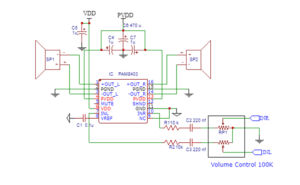
Audio amplifier using PAM8403

This is a basic circuit idea of making audio amplifier using PAM8403 chip. Note that this is readily available as a module. But if you need to try your hands…

  • January 13, 2026
  • Electronics, Project
Read MoreAudio amplifier using PAM8403

Simple FM Radio using TEA5767 Module

Introduction The TEA5767 is a single-chip electronically tuned FM stereo radio module for low-voltage applications with fully integrated Intermediate Frequency (IF) selectivity and- demodulation. The radio is completely adjustment-free and…

  • January 13, 2026
  • Electronics, Project
Read MoreSimple FM Radio using TEA5767 Module

Getting Started with Node Red on Raspberry Pi

What is Node Red ? Node red is an Open Source flow based tool for wiring together hardware devices, APIs and online services. It provides a browser-based flow editor making…

  • October 10, 2022
  • Electronics, How-To, IOT, Raspberry Pi
Read MoreGetting Started with Node Red on Raspberry Pi

How to enable virtual keyboard in Raspberry Pi

Why do you need virtual keyboard in raspberry pi? Well there can be multiple scenarios when you need virtual keyboard in raspberry pi. You might have added touch screen and…

  • October 2, 2022
  • How-To, Raspberry Pi
Read MoreHow to enable virtual keyboard in Raspberry Pi

Controlling RGB led using Raspberry pi

Introduction In this post we will see on controlling RGB LED using raspberry pi and python. RGB LED means red, blue and green LEDs. RGB LED products combine these three…

  • September 30, 2022
  • Electronics, How-To, Raspberry Pi
Read MoreControlling RGB led using Raspberry pi

How to start using Camera module with Raspberry Pi

Raspberry Pi computer with a Camera Module port All current models of Raspberry Pi have a port for connecting the Camera Module. Raspberry Pi Camera module Note: If you want to…

  • September 18, 2022
  • Electronics, How-To, Raspberry Pi
Read MoreHow to start using Camera module with Raspberry Pi

How to connect 8 inch Waveshare LCD display with Raspberry PI

This is in continuation with my earlier post on unboxing 8 inch Waveshare LCD display Here we will see how we can connect 8 inch Waveshare LCD display to Raspberry…

  • January 13, 2026
  • Electronics, How-To, Project, Raspberry Pi, Youtube Video
Read MoreHow to connect 8 inch Waveshare LCD display with Raspberry PI

Unboxing 8 inch Waveshare LCD display

Introduction 8inch capacitive touch screen with a hardware resolution of 800 × 480 with refresh rate of 60hz Capacitive touch panel, support 5-point touch. Supports Pi 4B It can be…

  • September 16, 2022
  • Electronics, Raspberry Pi, Youtube Video
Read MoreUnboxing 8 inch Waveshare LCD display
Prev
1 … 4 5 6 7 8 9 10 … 33
Next
  • Arduino
  • Electronics
  • ESP32
  • How-To
  • IOT
  • Linux
  • Misc
  • Photography
  • Project
  • Raspberry Pi
  • Software Testing
  • Tutorials
  • Youtube Video

Top Posts

  • ESP32 WiFi Scanner EP6: Add Battery Voltage and Percentage Monitoring
  • ESP32 WiFi Scanner EP5: Adding Touchscreen Navigation and Integrating WiFi & BLE
  • ESP32 Wi-Fi Scanner Project EP4 – Add BLE Scanner and Battery Support
  • ESP32 Wi-Fi Scanner Project EP3 – Display Live Wi-Fi Networks on TFT
  • ESP32 Wi-Fi Scanner Project EP2 – Build the TFT Display Framework (ST7789)

Share this

Copyright © 2026 - WordPress Theme by Pintu Shaw