Skip to content Skip to content
  • Home
  • Blog
  • Projects
  • How-To
  • Tutorials
  • Privacy Policy
  • About
Digital Lab

A home to software testing, electronics circuits & projects, tips and tricks and digital diary.

  • Home
  • Blog
  • Projects
  • How-To
  • Tutorials
  • Privacy Policy
  • About
Digital Lab

A home to software testing, electronics circuits & projects, tips and tricks and digital diary.

Selenium – The AndWait and the waitFor Commands

Difference between “AndWait” and the “waitFor” Commands The difference between a command and its AndWait alternative is that the regular command (e.g. click) will do the action and continue with the following command…

  • January 13, 2026
  • Software Testing, Tutorials
  • 1 Comment
Read MoreSelenium – The AndWait and the waitFor Commands

Raspberry Pi – Getting started

What is Raspberry Pi? The Raspberry Pi is a credit-card sized computer that plugs into your TV and a keyboard. It is a capable little PC which can be used…

  • September 16, 2022
  • Electronics, Raspberry Pi
Read MoreRaspberry Pi – Getting started

Sanity testing vs Smoke testing

Sanity testing and Smoke testing. What is the difference? For last 10 years I have answered this question justifying the answer which I read in book. This is also one…

  • January 13, 2026
  • Software Testing, Tutorials
Read MoreSanity testing vs Smoke testing

How to install KDE desktop in Linux Mint 15 Olivia

To add the KDE desktop environment to Linux Mint 15 1. Open a terminal window. 2. Type in the following commands then hit Enter after each. KDE Standard sudo apt-get…

  • December 12, 2013
  • How-To, Linux
Read MoreHow to install KDE desktop in Linux Mint 15 Olivia

How to root Galaxy Ace s5830i

This guide is for s5830i ONLY!!DON’T USE FOR s5830!!It can damage your phone!! How to root Galaxy Ace s5830i ? Put update.zip in your main directory in the SD card.…
  • September 26, 2013
  • How-To
Read MoreHow to root Galaxy Ace s5830i

LED Driver using 7805 and LM317

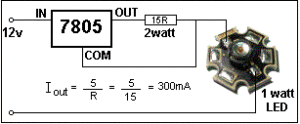
LED Driver using 7805 The 7805 can be converted into a content-current device by connecting a resistor as shown below.   As the 12v rises from 0v, the 7805 starts…

  • May 17, 2016
  • Electronics
Read MoreLED Driver using 7805 and LM317

How to Turn Off Auto Update in Google Chrome

Google Chrome on Windows auto update itself on a regular basis.  The auto-updating procedure is performed by Google Update.  Auto-updated provide fixes to sometimes critical issues. At times during testing…

  • October 29, 2013
  • How-To
Read MoreHow to Turn Off Auto Update in Google Chrome

Selenium WebDriver – 5 Minute Getting Started Guide

Selenium 2.0 is commonly called as Selenium WebDriver  as it is integrated with WebDriver API. WebDriver is designed to provide a simple and concise programming interface in addition to addressing…

  • October 4, 2026
  • Software Testing
Read MoreSelenium WebDriver – 5 Minute Getting Started Guide

Distributed testing in Jmeter

You have reached the limit of one machine while doing your load testing and now want to distribute your load from different machines. In Jmeter it is commonly called as…

  • October 8, 2014
  • Software Testing
  • 1 Comment
Read MoreDistributed testing in Jmeter
Prev
1 … 22 23 24 25 26 27 28 … 33
Next

Arduino Arduino Uno audio amplifier automated testing Azure Basic Electronic Theory Circuit Idea Circuit Ideas docker ESP32 ESP32 Projects ESP32 WiFi Scanner Featured How to IOT JMeter LED Linux load testing NE555 performance testing Power Supply python Raspberry pi raspberry pi. Raspberry pi PICO Security Testing selenium test automation testing testing basics

Latest Posts

  • Build a 3-Level Water Level Indicator with 2N2222 Transistors (No Arduino Needed)
  • ESP32 GPS Data Logger with TFT Display and SD Card: Map Your Route on Google Maps (EP2)
  • How to Make a Simple Door Alarm Using a Reed Switch & 2N2222?
  • ESP32 GPS Data Logger EP1: Get GPS Data and Save It to SD Card
  • ESP32 WiFi Scanner EP6: Add Battery Voltage and Percentage Monitoring

Share this

Copyright © 2026 - WordPress Theme by Pintu Shaw